FLAC To MP3
FLAC To MP3 Converter Software Download
 Easily - Convert FLAC Audio To MP3 Music Just In Only 3 Clicks.
Fast - 180% faster than other audio Converter.
Input - Support more than 20 media formats input.
Output - Support MP3, WMA, WAV, AC3, AMR formats output.
Batch Mode - Convert HUNDREDS of FLAC Songs to MP3 audio at One Time.
Easily - Convert FLAC Audio To MP3 Music Just In Only 3 Clicks.
Fast - 180% faster than other audio Converter.
Input - Support more than 20 media formats input.
Output - Support MP3, WMA, WAV, AC3, AMR formats output.
Batch Mode - Convert HUNDREDS of FLAC Songs to MP3 audio at One Time.
[New] New version supports Unicode FLAC Files!
FLAC To MP3 is a windows converter application for converting Flac to MP3 audio quickly. With the converter, users can convert FLAC music to MP3 audio format in few clicks. Also, the converter supports Batch Mode to convert hundreds of FLAC audio to MP3 music at one time. During the conversion, the program could keep the original metadata and tags as well, which means users will not lose the information of a song like album, producer, actor or age etc. Looking for a Mac Version? Please check FLAC To MP3 Mac
FLAC To MP3 Screenshot
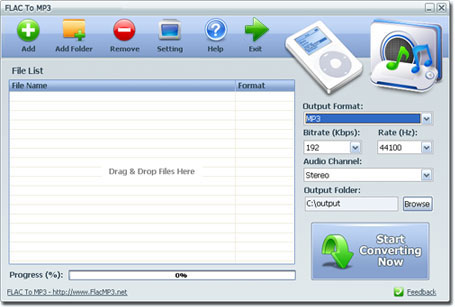
Fast Tutorial - How To Use FLAC To MP3 to Convert FLAC Files to MP3
(1) Add FLAC files you want to convert
(2) Set output format, audio bit rate, rate, audio channel and output path
(3) Click the Start Converting Now button to start the task
Video Tutorial
How to Convert FLAC To MP3 on Windows 11 in 5 Steps - Quick Guide
FLAC to MP3 Converter is a go-to downloadable Windows 11 app that can process FLAC audio clips into MP3 clips without losing the quality in the converted files.
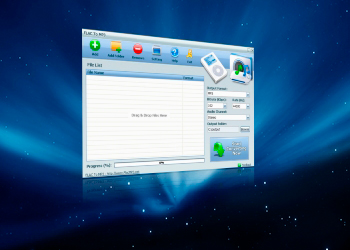
Step 1.
Windows 11 users can download the installation package of FLAC To MP3 converter from the official site download page.
Step 2.
Install the FLAC To MP3 Converter by double-clicking on the installation package. (The installation process of this audio converter is automatic and finishes quickly.)
Step 3.
Hit the "Add Button" or "Add Folder" button to upload FLAC audio files into the converter tool for quick FLAC to MP3 conversion output.
Step 4.
Define the Output Path for the altered audio files. Output Path can be set by using the Browse button. Newly altered MP3 audio files would be saved in the selected Windows 11 storage Location.
Step 5.
Finally, hit the "Start Converting Now" button to start the conversion process instantly.
You can check the converted files in your predefined storage location of Windows 11.
Windows 11 is compatible with most of the tools available on the internet for converting FLAC audio clips to MP3 audio songs. However, you must use a secure and efficient tool for the conversion of personal FLAC files into MP3 files.
Most of the operating systems act as a primary platform for creating harmony among the hardware and software parts of a computer. The operating systems instruct the hardware parts of the computer to perform the instructed acts. From the development of computers in the early days, Windows was the top operating system in the market. Windows is known to have the most shares of the computer market than any other computer operating system. Due to easy user interface, Windows and its variants are known as the best platforms for doing most of the tasks in combination with other softwares.
Windows 11 users can get their copy of FLAC To MP3 Converter for fast and high-quality conversion of FLAC audio clips to MP3 audio clips. FLAC To MP3 Converter is a superlight audio Converter app that lets the Windows 11 users process all of their FLAC audio clips into MP3 audio clips in a bulk processing mode. Windows 11 users can expect the following features in the FLAC To MP3 Converter.
FLAC To MP3 Benefits
1. 100% Secure Installation
Both paid and free versions of the FLAC To MP3 Converter app are free from all kinds of spam installations and spyware. Windows 11 users can download this converter app in their PCs without any security risk.
2. Easy To Use
FLAC to MP3 Converter is a useful audio editor that can is tailor-made for bulk abs single conversion of FLAC audio clips to MP3 format. Conversion of FLAC audio files to MP3 audio files by using this downloadable Windows 11 app has a straightforward user interface. Windows 11 users can convert their FLAC audio clips into MP3 clips by following a simple 3 step process in this app.
3. Fast Audio Conversion Rate
FLAC to MP3 Converter processes the audio conversion requests 180 times faster than most audio conversion tools available for Windows 11. Due to the fast processing speed of this converter app, Windows 11 users can convert multiple FLAC files into MP3 audio clips quickly.
4. Batch Mode Processing
The batch mode helps the Windows 11 users to process hundreds of FLAC audio files into the converter app in a single conversion attempt. 180 times faster processor of FLAC to MP3 Converter app only takes a few minutes in converting the audio of selected files.
5. Wide Range Input and Output Support
FLAC to MP3 Converter lets the Windows 11 users input their sound files in more than 20 other audio formats. Uploaded audio files can be converted into these audio file formats — MP3, WAV, AMR, WMA, AC3. Furthermore, the program does not overwrite the original audio file and saves the converted files into the chosen destination in the storage drive.
6. Unicode File Support
FLAC To MP3 Converter for Windows 11 also contains the Unicode file conversion support. The audio converter does not modify the descriptive codecs of the converted audio files. Windows 11 users can access all the original information about the converted files, as well.
7. Premium Quality Conversion
Windows 11 users can select the level of quality and format of the converted audio files by adjusting the bitrate ratio of the converted files. A high bitrate ratio gives high-quality MP3 files an output.
Awards of FLAC To MP3

Features of FLAC To MP3
- - Easy To Use
- - Fast Conversion
- - Convert Audio Files in Bulk
- - 20+ Formats Input
- - Popular Audio Formats Output
- - High Quality Conversion